• Home
  • Power Generation
  • Air/Sea Crafts Design
  • Software
    • Yams >
      • Yams base validations
      • Yams comparison with references
      • Yams demo design
  • Training
  • Team
  • News
  • Contact
SSG AERO - Agile Aerodynamic Design
  • Home
  • Power Generation
  • Air/Sea Crafts Design
  • Software
    • Yams >
      • Yams base validations
      • Yams comparison with references
      • Yams demo design
  • Training
  • Team
  • News
  • Contact

Some news

Volute Design: The fight is over

11/30/2017

0 Commentaires

 
Keywords: release, geometry, volute, software, demonstration, CAD

Introducing our very first demonstrator

Quoting famous French singer Alain Bashung, the fight to design proper volutes is now gone into smoke and ashes:
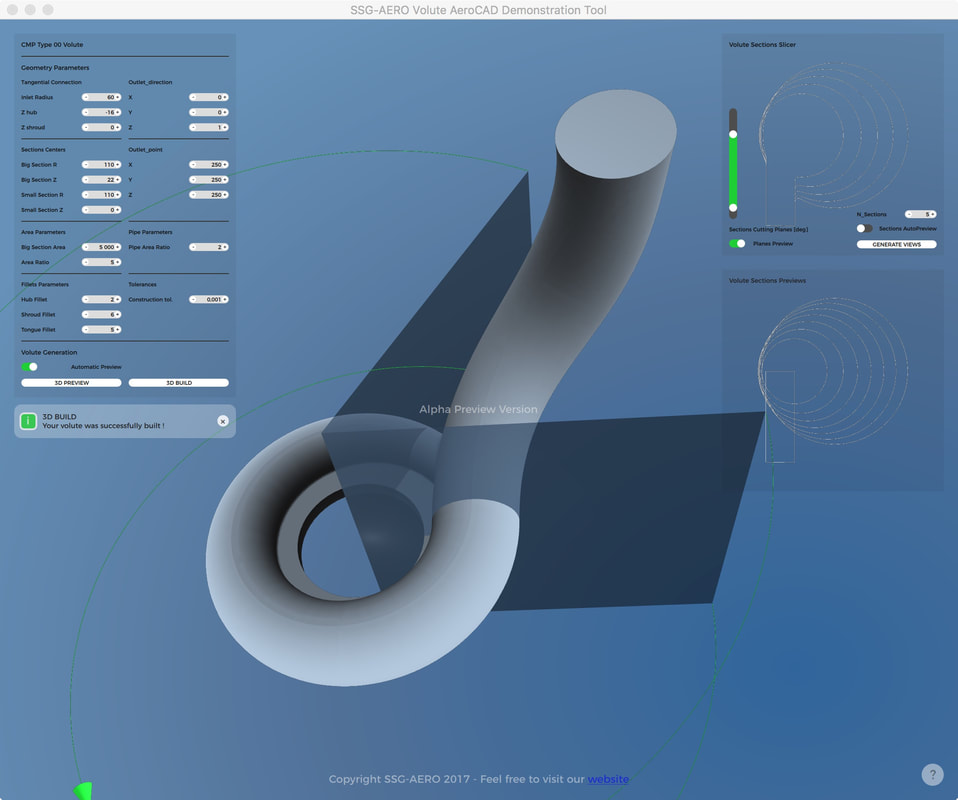
SSG-Aero is very proud to introduce the first demonstrator of its line of products: the Volute Designer.
Photo
Simple in appearance, it includes all the power of our algorithms in one demonstrator, enabling users to test on template and play around the parameters.

Download

For those interested, here is a link to the download form, where the only price you’ll have to pay is provide limited information about you so we can keep you updated on our developments in a more personal way:
Go to Download Form Page

Installation

Our Demo Software is only available for Windows, for timing purposes only.
Our software shall be available on all the platforms.

To run our demo software,
  1. Download it (see Download for this purpose)
  2. Extract it in a directory
  3. Install Visual Studio if you do not already have it on your machine. We have added an installer in the download package named vc_redist.x64 for this purpose.
  4. run the executable called tst_demo_main

Mini Tutorial

The following videos shows how it works and what it does:
The concept of the mini interface is fairly simple: 1 window for control, 2 for analysis, and the geometry in the background:
  • the geometry parameters window lets you control the shape of the sections, and of the outlet tube, considering that the volute rotational axis is the Z-axis,
  • the Volute Sections Previews window shows a rough sketch of the sections shapes in order to master what you are doing, 
  • the Volute Sections Slicer lets you check the build surface with the fillets to see how the real sections shall look like.
These windows can be moved or be resized depending on your preferences.

As we deal with compressor volutes here, the smallest section has to be positioned inside the biggest section.
The fillets radius value on the sections can equal zero, hence allowing a slope discontinuity in the sections.
If ever a problem occurs during the construction of the surface, a message will pop-up, and you will see how far the geometry was build in the background. Most of the time, the limits are reached when the tongue shape requires a complex fillet shape, such as an evolutive fillet radius, or when the tangential connection does not properly intersect the volute itself.

There are some other limitations. The most notable is the value of the fillets. If the user asks for a big fillet radius on a very small section, there may not be a solution. On the other extreme, very small fillets can be hard to be visualized. If ever you are used to extremely small volutes, change scales! On the export sections, we’ll manage everything so that your geometry is great... whatever its size! Of course the product can export the geometry into an IGES file… but we keep this functionality for customers. Thanks for your understanding!

Future Developments

The template used to generate the volute in our demonstrator is quite simple, but shows the potential of our tool. Using the same ergonomics and algorithms, we are now working hardto implement more shapes into it:
The CMP TYPE01 is under tests and almost ready for integration!
These templates will cover most of the basic industrial cases. Of course we are also available to develop your own templates for a personal version of the volute designer !

​We are also planning to create a constraint-based shape optimizer to free designers totally from templates.

A bigger Picture

As mentioned in earlier posts, this demo is a glimpse of a bigger project where SSG-AERO shall put all its experience to help people master their designs, not the tools they work on.
Our design environment shall enable to construction of complete turbo-machines.

​We did not forget the volute multi-grid structured mesh, which is currently being migrated from our old GUI…

Conclusion

Please feel free to test and feedback us on this glimpse of our work.
We do thank you for your attention, and shall keep you posted here !

​SSG-AERO

0 Commentaires


Leave a Reply.

    Archives

    Mai 2021
    Avril 2021
    Janvier 2019
    Novembre 2018
    Septembre 2018
    Mars 2018
    Janvier 2018
    Novembre 2017
    Octobre 2017
    Juillet 2017
    Juin 2017

    Catégories

    Tout
    Technical

    View my profile on LinkedIn

    Flux RSS

    View my profile on LinkedIn
Photo
Photo

Copyright © 2021 ssg-aero
  • Home
  • Power Generation
  • Air/Sea Crafts Design
  • Software
    • Yams >
      • Yams base validations
      • Yams comparison with references
      • Yams demo design
  • Training
  • Team
  • News
  • Contact